
Broken Link Checker
Detect broken links, 404s, timeouts and redirect chains.
Find broken links instantly
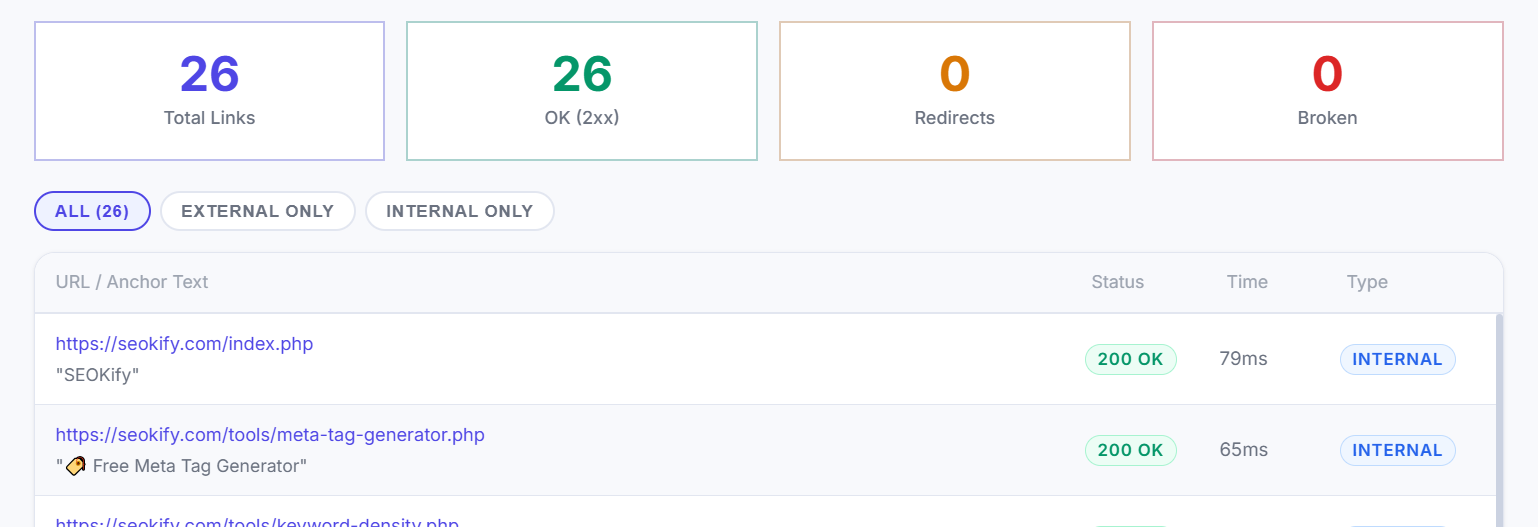
Enter any URL and we'll crawl every link on that page — checking status codes, redirect chains, and response times.
What is Broken Link Checker?
Check your website for broken links, 404 errors, and dead URLs instantly with our free Broken Link Checker tool. Improve SEO, user experience, and site health by fixing broken internal and external links.
Fetches any public URL, extracts all hyperlinks from the page HTML, and sends HTTP requests to each one — reporting status code, response time in milliseconds, and redirect chain. Broken links (4xx/5xx errors) are highlighted and sorted to the top for immediate action.
Broken links are one of the most common technical SEO issues that can negatively impact your website’s ranking and user experience. A broken link leads to a page that no longer exists, resulting in 404 errors, poor navigation, and loss of trust from visitors and search engines.
Our Free Broken Link Checker Tool helps you instantly scan your website and detect all broken internal and external links so you can fix them before they affect your SEO performance.
Why It Matters for SEO
Broken links frustrate visitors, waste crawl budget, and cause link equity to leak out of your site. A high proportion of broken internal links can negatively impact crawl efficiency.
Broken links can harm your website in several ways:
Reduce Google crawl efficiency.
Waste crawl budget on dead pages.
Lower user experience and trust.
Decrease SEO rankings.
Break website navigation flow.
Search engines prefer clean, well-structured websites with working links. Fixing broken links regularly improves indexing and ranking performance.
Best Practices for Fixing Broken Links
Replace broken URLs with correct live pagesUse 301 redirects for moved pages
Remove unnecessary external links
Update outdated references
Run regular website SEO audits
How to Use This Tool
- 1 Enter the full public URL of the page to check
- 2 Click Check Links and wait 15-30 seconds
- 3 Review the summary (Total / OK / Redirects / Broken)
- 4 Filter to Broken or External only
- 5 Fix 404s by updating URLs or setting up 301 redirects
Frequently Asked Questions
A broken link checker is a tool that scans websites to find URLs that are no longer working or returning errors.
Some servers block HEAD requests or enforce rate limits. The tool uses an 8-second timeout per link.
404 means not found (potentially temporary). 410 means permanently gone. Use 410 for intentionally deleted content to signal finality to Google faster.
Broken links can harm SEO, reduce user trust, and make it harder for search engines to crawl your site.
Yes, this broken link checker is completely free to use online.
Yes, it detects both internal and external broken links.
How often should I check my website?