
Page Speed Checker
Test page speed, Core Web Vitals and performance scores via Google API.
Page Speed Checker
Test any page for performance scores, Core Web Vitals (FCP, LCP, CLS), and loading metrics.
What is Page Speed Checker?
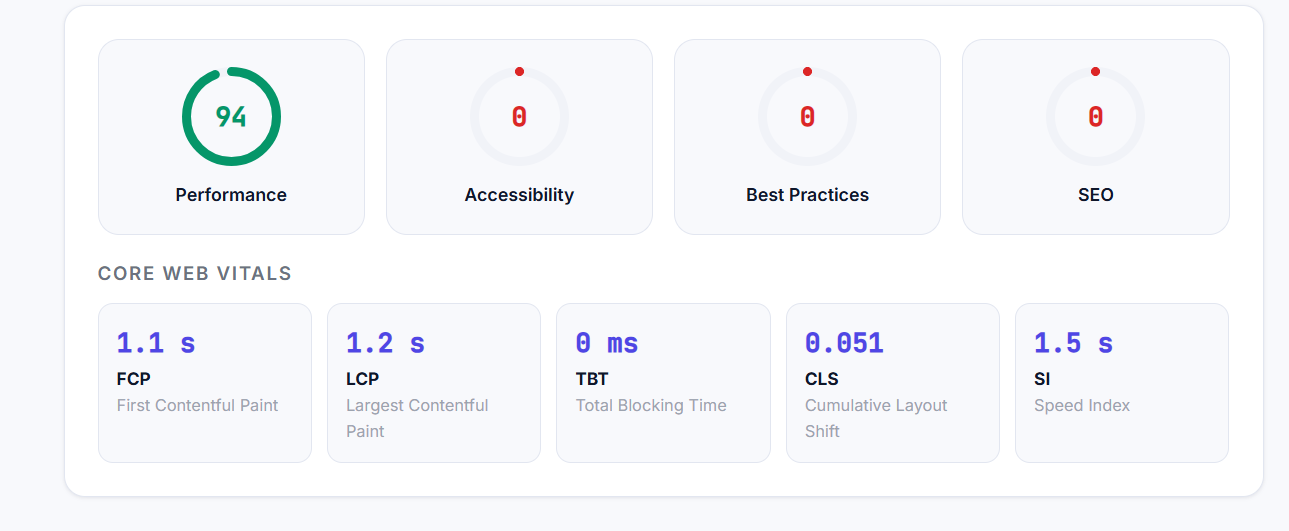
A Page Speed Checker analyzes your website’s loading time and gives you a performance score. It highlights issues like large images, render-blocking scripts, and server delays that slow your site down.Measures page loading speed and Core Web Vitals using Google PageSpeed Insights API (with API key) or built-in server timing analysis. Scores Performance, Accessibility, Best Practices, and SEO on a 0-100 scale and reports FCP, LCP, TBT, CLS, and Speed Index.
Why It Matters for SEO
In today’s fast-paced digital world, website speed matters—a lot! If your site takes more than a few seconds to load, you’re likely losing visitors, conversions, and even SEO rankings. That’s where a Page Speed Checker tool comes in handy. Let’s dive into how you can use this tool to make your website faster and more efficient.
Page speed is a direct Google ranking factor. Core Web Vitals (LCP, FID/INP, CLS) became official ranking signals in 2021. A 1-second delay in load time reduces conversions by 7% and increases bounce rate significantly.
Why Page Speed Matters
User Experience: Slow sites frustrate users. 53% of mobile users abandon sites that take over 3 seconds to load (Source: Google).
SEO Ranking: Google considers speed as a ranking factor.
Faster sites rank higher.Conversions: A 1-second delay in page load time can drop conversions by 7% (Source: Amazon).
How to Use This Tool
- 1 Enter your page URL
- 2 Select Mobile or Desktop testing
- 3 Click Test Speed
- 4 Review the four category scores
- 5 Focus on LCP (under 2.5s) and CLS (under 0.1) for the highest ranking impact
Frequently Asked Questions
A Page Speed Checker analyzes your website’s loading speed and performance, highlighting issues that slow it down
Optimise for mobile first. Google indexes the mobile version of your site, so mobile performance has the greater SEO impact.
Page speed impacts user experience, SEO rankings, and conversions. Faster sites rank higher and retain visitors better.
Yes, Seokify’s Page Speed Checker is free to use.
Check monthly or after major updates to ensure optimal performance.
Yes. Google considers speed as a ranking factor for both desktop and mobile searches.